Anchor
Get direct answers with page citations from 500-page PDFs in seconds instead of skimming for hours.
What it is
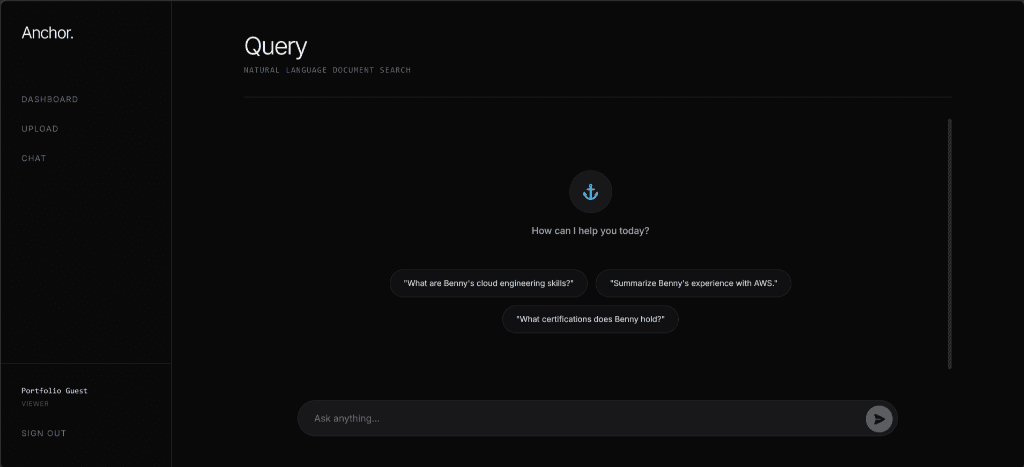
I built Anchor as an intelligent document search tool that reads complex PDFs and answers questions about them. You upload a manual or policy guide and ask a question in plain English. Anchor returns a verified answer with the exact source page number.
What it does
- Find exact answers in seconds across hundreds of pages without manual skimming.
- Verify every claim with direct page citations linked to the original document text.
- Ask questions naturally without needing technical keywords or exact phrasing.
- Prevent guesswork by relying only on confirmed text inside your uploaded file.
How it works
When you upload a PDF, Anchor sends it to an automated text reader (optical character recognition, or OCR) to extract every word. The app slices the text into short paragraphs and converts each one into a list of numbers (an embedding) to capture its meaning. Anchor saves these numbered paragraphs in a searchable database.
When you ask a question, an AI triage assistant checks your intent first. Simple greetings get an immediate reply, while real inquiries get converted into an optimized search query. The database matches the math of your question against stored paragraphs. An AI assistant then reads the best matches and writes a concise answer with citation tags.
Why it matters
Teams waste hours searching dense handbooks for single policy rules. Anchor returns precise answers with verified page numbers in under three seconds, removing manual lookups and eliminating hallucinated answers.
Technical Documentation
Architecture / System design
Anchor isolates workloads across dedicated cloud services: Next.js and Microsoft Entra ID handle authentication and routing, AWS S3 and Textract run asynchronous OCR ingestion, Supabase pgvector manages vector storage and cosine search, and Google Gemini powers 768-dimension embeddings and agentic response generation.
Implementation details
- Ingestion & Indexing: S3 PDF uploads trigger asynchronous AWS Textract OCR (
status: processing). The backend polls completion, chunks text into 500-token blocks (50-token overlap), generates 768-dim Gemini embeddings (text-embedding-004), and stores vectors in Supabasepgvector(status: ready). - Agentic Retrieval & Grounding: Gemini 1.5 Flash evaluates user queries. Informational searches generate 768-dim vectors to retrieve top-5 chunks via cosine similarity, synthesize answers with bracketed page citations (
[1]), and retry up to twice with rewritten queries if context is missing. - Two-Tier Rate Limit Defense: Server-side IP rate limiting checks client request velocity before querying Google Gemini, shielding upstream quotas from abuse. If upstream quotas are reached, custom Next.js error handlers catch HTTP 429 exceptions and render clear user-facing retry prompts rather than generic 500 crashes.
- File Header Validation: To prevent malicious files disguised as PDFs, the API inspects the binary magic number (checking for
%PDF-header bytes) instead of relying solely on the file extension. - Prompt Injection Hardening: User queries are constrained by input length limits, wrapped in strict XML delimiters to separate system instructions from user data, and passed through an output sanitizer to prevent the AI from executing hidden commands.
- Clickjacking Defense: Next.js middleware enforces strict HTTP security headers (including
X-Frame-OptionsandPermissions-Policy) to ensure the application cannot be embedded invisibly on malicious third-party websites.
Why this approach?
- Chose 768-dimension embeddings over 3,072 dimensions because Supabase
pgvectorcaps vector columns at 2,000 dimensions - the tradeoff was losing minor theoretical precision for fast HNSW indexing. - Chose a multi-cloud split (AWS Textract + Google Gemini) over an all-AWS stack because AWS Bedrock rate limits throttled new accounts - the tradeoff was managing dual cloud credentials to prevent upload stalls.
- Chose front-door agent triage over direct vector search because non-informational queries wasted database calls - the tradeoff was ~200ms initial latency to gain automated query rewriting and search retries.
- Chose server-side IP rate limiting and error interception over unthrottled proxying because rapid agentic multi-requests exhausted free-tier provider limits in production - the tradeoff was tracking client IP counters to preserve uptime and prevent 500 errors.
- Chose binary magic number validation over simple extension checking because renaming a malicious executable to .pdf bypasses basic filters - the tradeoff was slightly more complex file parsing during the initial upload.
- Chose strict XML delimiters over unstructured prompt concatenation because attackers can easily confuse AI models by injecting fake system commands - the tradeoff was designing rigid prompt templates instead of free-flowing conversational logic.
- Chose Next.js middleware for HTTP security headers over server-level config because it provides granular route control within the application framework - the tradeoff was a minimal processing overhead on every request.
Known limitations
- Upstream Free-Tier Quota: While local IP rate limiting and 429 interception prevent crashes and bot exhaustion, high aggregate traffic across all users remains bounded by provider-level limits.
- Document-Scoped Search: Retrieval targets active documents rather than organization-wide workspaces.
Future work
- Replace background polling with SQS / webhook event notifications for OCR completion.
- Support multi-document workspace search.